I Built a Complete Web App Using Google's Free AI — Honest Results
I wanted to see if Google AI Studio’s free tier could deliver a highly polished starting point for an application, so I built an AI travel itinerary planner using the new Gemini 3.5 Flash model. The goal was simple: provide a destination, budget, duration, and interests, and have the app generate a day-by-day traveling schedule.
What I Built
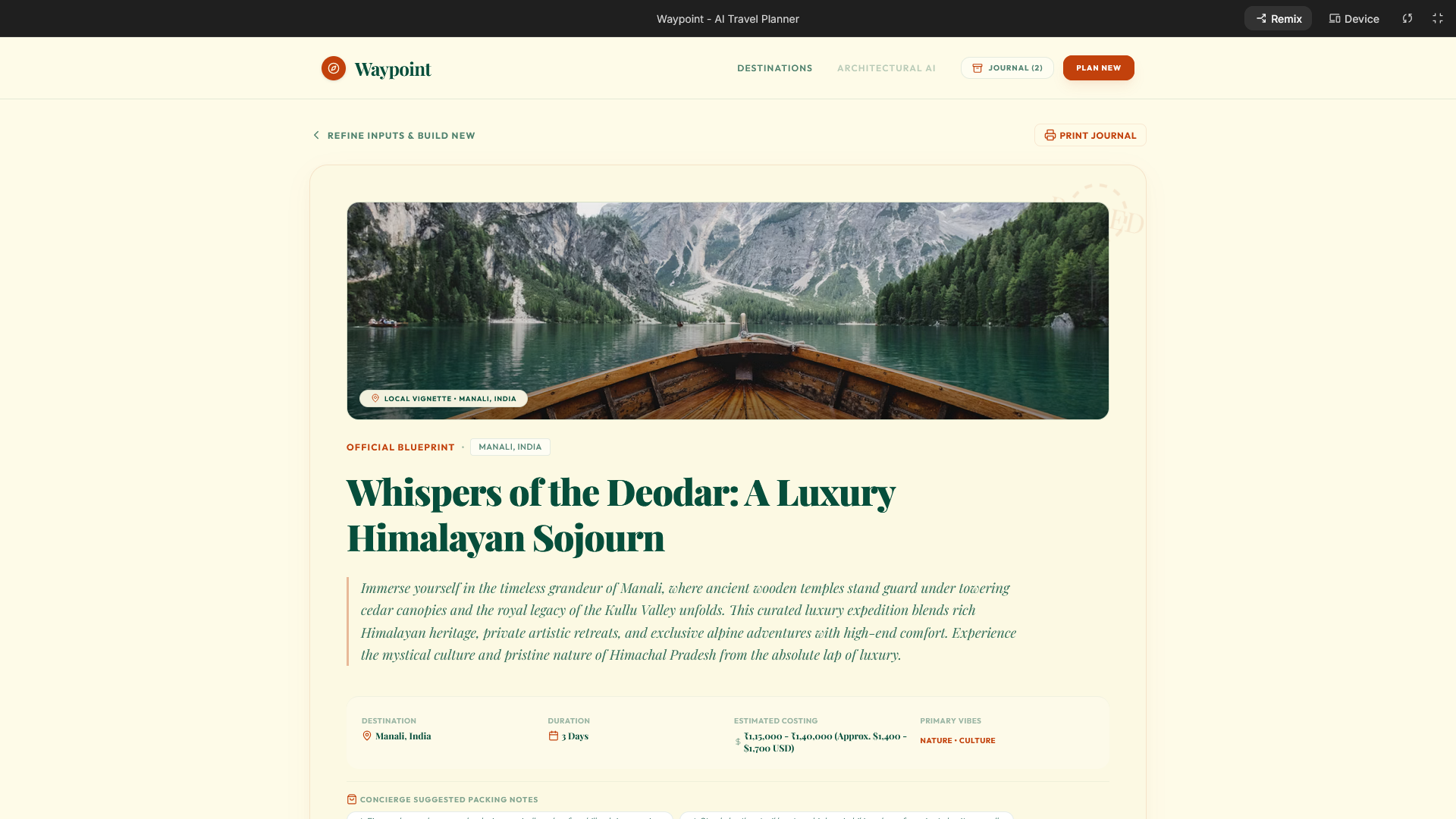
The application is structured around a prompt-driven generation workflow. Instead of feeding a raw, basic idea directly into AI Studio, I used Gemini to structure the app blueprint first. This intermediate planning phase defined the user flow, visual theme, typography, color palettes, and even the name of the site, which we called Waypoint AI.
Once the blueprint was finalized, the structured prompt was fed into Google AI Studio using Gemini 3.5 Flash. The code generated by the model sets up a functional frontend that collects user inputs—destination, duration, budget level, and specific interests like adventure, food, or culture—and feeds them back into the AI to render a day-by-day schedule divided into morning, afternoon, and evening slots.
What Worked
- UI Polishing and Responsiveness: The visual output was clean right out of the box. The component layout applied the chosen design theme correctly and maintained responsiveness. Testing the application across desktop, tablet, and mobile views showed that it was properly optimized for every screen size without breaking the layout.
- Persistent Search State: The generated application automatically saved past user searches. If you navigated through the interface, previous destinations remained accessible, allowing you to re-open generated travel routes seamlessly.
- Error Resilience: When a system error occurred during the initial submission testing, the app successfully captured the exception and displayed a direct interface button to run a automated fix routine, which successfully resolved the issue.
What Failed
- Initial Image Placeholders: I wanted to pull relevant visual previews for the destinations. Since this was built on a free tier without dedicated storage buckets, I instructed the model to integrate the free Unsplash API for stock images. The first iteration generated the image placeholder blocks perfectly but failed to actually pull or render any images, requiring an extra prompt iteration to get the logic working.
- Broken Print Button: The interface generated a Print Journal button by default. However, clicking it resulted in no action. The feature remained entirely non-functional and requires manual coding or an extra development cycle to connect it to a printing utility.
- Context Window Degradation: The major limitation comes from the free tier context window. Once the conversation history grows too large during iterative debugging, subsequent code updates start to lose coherence, and the quality of the generated modifications drops significantly.
Verdict
Using Gemini 3.5 Flash on the free tier will not give you a production-ready system, but it successfully delivers a highly polished starting prototype. It works well as a foundation for a new business concept or an initial startup validation phase. However, as the application scales and bugs pile up, the context window limitations mean you will eventually have to shift from pure AI prompting to either hiring a developer or upgrading to a paid enterprise tier to handle deep context development.